Logo
  • Submit a request
  • S'inscrire
  • Submit a request
  • Sign up
  1. Twenga Solutions
  2. My account

Articles in this section

  • How do I personalize my password?
  • How do I change my personal information?
  • How can I close my account?
  • How can I set a budget for my campaign?
  • I lost my password to connect to Twenga Solutions
  • How do I change the language of the Twenga Solution interface?
  • Where can I find my client number/client ID?
  • Where can I find my contract/Terms and Conditions?
  • Can I link several of my accounts?
  • What should I do when an error message appears in my interface?
See more

Where can I find my client number/client ID?

Avatar
Héloïse
  • 23 August 2024 16:34
  • Updated

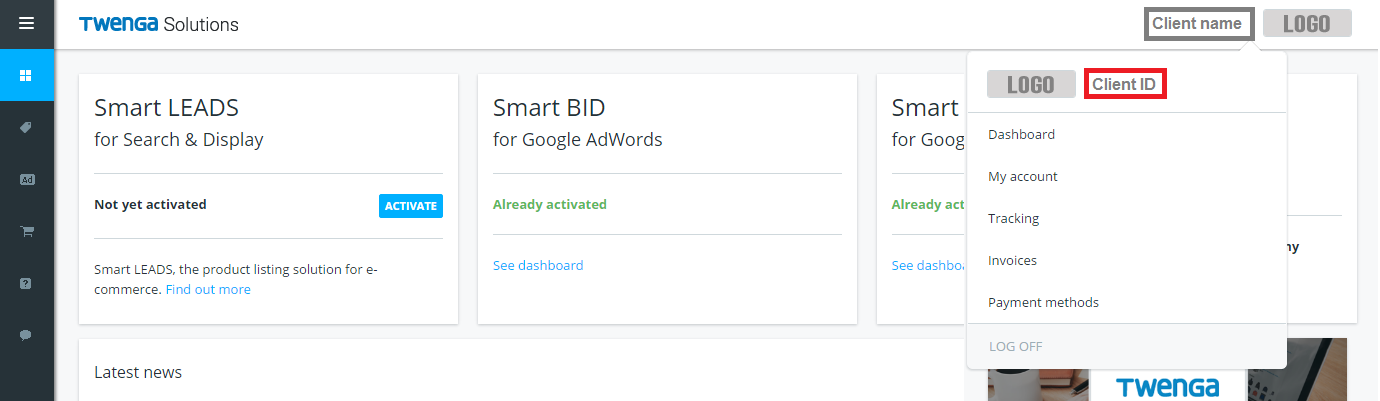
To access your client ID, connect to the Twenga Solutions interface.

Click on the drop-down menu in the top-right of your interface, just next to your website name and logo. Here, you will find your client ID:
Have more questions? Submit a request
Return to top

Related articles

  • How to install Twenga Pixel?
  • How can I find my products on Twenga?
Twenga Solutions

Nous proposons des solutions d’acquisition de trafic avancées pour plus de 4 500 clients dans 16 pays.

Twenga Solutions

We provide advanced traffic acquisition solutions for over 4,0500 customers in 16 countries.

  • Nous contacter
  • S'inscrire
  • Mentions légales
  • À propos
  • Politique de confidentialité

Copyright Twenga 2024 - Tous droits réservés

  • Contact us
  • Sign up
  • Legal terms
  • About
  • Privacy policy

Copyright Twenga 2024 - all rights reserved